
Just added another project to my sidebar -- Image.NET. K, sounds a little more amazing than it is. It doesn't do all kinds of wicked image file manipulations or stuff like that. What it does do is show pictures.
Wow.
I wrote it because I'm sick of all the crappy image file viewers out there. Most of them either flat out suck or are so full of bloat that they... flat out suck. So I wanted something that would do two tings, and two things only:
1) Show images
2) Leave me the fuck alone
So that's what Image.NET does. Right now you have to select the files you want to view. I'm looking to integrate it into the shell better, so you can do stuff like right click on a bunch of image files and view them in Image.NET or just select a bunch of them and hit enter and all that kind of stuff. Anyhow, lightweight, no bloat, view images. Check it out if you're bored.

Most of the time breaking into a program you're debugging is easy. Just load the project in your IDE of choice, set your breakpoint, and run. But what happens when you can't run your program via the IDE? Its sometimes hard to do for things like providers and services that cannot be directly executed by the development environment or that require complex setups or mock frameworks in order to host for debugging. Or something.
Anyhow, there's a simple way to force a program to break, ask to have a debugger attach to the process, and then break for debugging. Here's the code:
#if DEBUG
if (!System.Diagnostics.Debugger.IsAttached)
{
System.Diagnostics.Debugger.Launch();
}
System.Diagnostics.Debugger.Break();
#endif
The Debugger object has some lovely static methods that allow us to check and see if a debugger is attached, and if not, request one be attached. I could show you what the dialog looks like, but its about 1:30 Saturday morning and I'm 100% sober. Please, let my suffering end a little bit quicker.
Damnit, you friggin bastards. Okay. Here it is:
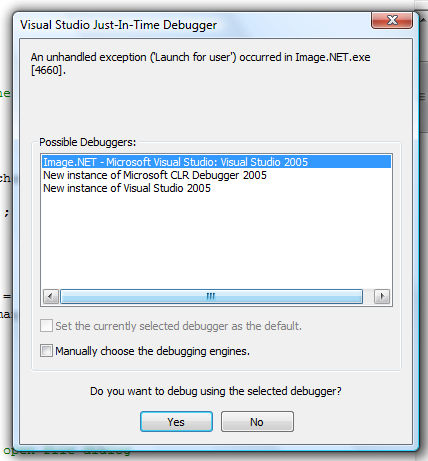
Right, so just pick the version of your IDE that has your source loaded and you're off and running. The Break() method acts just like a breakpoint. Oh, and wrapping these statements in the #if DEBUG #endif construct ensures that only the debug version will behave in this way. Cool.

Been a bit busy and a lot lazy recently. Time to post!
One of the tools every user has for accessing menu items are mnemonics. Mnemonics, other being one of the freakiest words in the English Language, is a method of accessing menu and toolbar items via the keyboard. Mnemonics in Windows programs are accessed by an alt-[key] combination, similar to the way shortcuts are accessed via ctrl-[key]. An example of a mnemonic you can use right now is alt-f. That opens up the File menu on just about every Windows program. To get a quick idea what mnemonics are available to you in a program, hit the alt key and look at the program's menus and toolbars. See how some of the letters are now underlined? Those are your mnemonics. Use them with the alt key to perform a "click".
Programming in mnemonics is pretty simple in Windows Forms. Everything you see in a program, from the lowly Label to the big daddy Form itself is an extension of the System.Windows.Forms.Control class. From this virtual class they inherit the Text property. The implementation of this property is left for inheritors, but if the control displays text and takes input, your mnemonic will be set by using this property. The standard convention is to, when setting the text of this property, prefix your mnemonic with the "&" symbol. For example, if I was going to name my File menu, I would do the following:
MenuItem _fileMenu = new MenuItem();
_fileMenu.Text = "&File";
By simply placing the "&" before the letter F I designate that alt-f will be the mnemonic for the control. Nice and simple. And that's where it gets you.
You see, every keypress you make must be examined to determine if it is normal input or a mnemonic key combination. If the keypress event (not an actual event name but a group of events; check this blarg post for more detail than you could ever want about the process) is a combination of the alt key and any of the keys a-z and 0-9, that is treated as a mnemonic. And if no control is watching for that mnemonic, you get beeped at.
What this means is that if you have a menu or toolstrip in your program, you cannot use alt-key combinations for anything other than mnemonics, otherwise every time your users... use... that function, your program will ding at them. Extremely annoying. Unfortunately, the standard events for handling key presses can't be used to intercept the key event and prevent it from bubbling to your menus and toolstrips, thus preventing the beep from bugging the crap out of you and your users. Which is why I'm writing this.
I'm working on a dinky little side project right now, and one of the features is the ability to go into fullscreen mode. The standard mnemonic for this is alt-enter. Try it in Windows Media Player. Unfortunately, because mnemotics are designated by placing an "&" in the text of a control before the letter you wish to use... well, you can see the issue here. Besides, I have a Fullscreen button on my toolbar (and no menu--its a very simple program by design), I want to use alt-f as another means to go to fullscreen. I can add a KeyUp event handler in the form and intercept the alt-enter key combination in order to perform a fullscreen, but again I can't prevent that event from bubbling to the toolbar, which will trigger a beep as it doesn't have an alt-enter mnemonic. So, is there a solution?
Well, its a good thing you asked (goddamn, I'm dragging this out). There is. You can override the form's ProcessDialogKey method and intercept that key combination and mark it (by returning true from the method) as not being a mnemonic. The method is as follows:
/// <summary>
/// Processes a dialog key.
/// </summary>
/// <param name="keyData">One of the <see cref="T:System.Windows.Forms.Keys"></see> values that represents the key to process.</param>
/// <returns>
/// true if the keystroke was processed and consumed by the control; otherwise, false to allow further processing.
/// </returns>
/// <remarks>The purpose of this override is to prevent alt-enter from being processed as a command, which results in the windows beep being played as it is not a valid mnemonic.</remarks>
protected override bool ProcessDialogKey(Keys keyData)
{
if (keyData == (Keys.Alt | Keys.Enter))
return true;
return base.ProcessDialogKey(keyData);
}
Of course, you can substitute Keys.Enter for any key you wish to prevent from being identified as a mnemonic. And that's that.

Well, had a nice post worked up on MS' Acropolis worked up and just about ready to go. Then the edit control ate it.
A word of warning for my fellow beta testers--don't trust the edit control. If your post is going to be longer than one paragraph, do it in Notepad or something.
Here's what I did:
- Wrote about 1000 words on Acropolis
- Accidentally hit ctrl-z, which "undid" my last paragraph
- Hit ctrl-r, which in any normal application, would "redo" what I "undid", but which actually reloaded the page
- Stared at the empty edit box
- Cried
Do not, repeat DO NOT trust the goddamn edit control.
Just hit upon this site: www.pcdecrapifier.com, which offers a program that supposedly will clear all the installed junk that comes on most new PC's. I haven't used it, but after a quick search I don't see any bad mentions about the product on any discussion boards. Looks like a great tool, tho! Next time I need to wipe a new machine (which may be within the next few months, the way my home server's been acting), I'm going to give it a try.
Well, the release is completed, and I'm extremely glad in this. This one pushed my sql knowledge to its limits and beyond. The system I code against has a very complicated security model with five, yes five, different types of security. The last one was added in this release. On paper it didn't look very complex, I found out that it made my security checks exponentially more difficult. My query that retrieves items from the tree that the current user can view, when printed out in Notepad with the standard margins, is eleven pages. Eleven. E-lev-en. It returns multiple recordsets with all the data I need, so the security related WHERE's constitute about 3/4ths of the bulk of the queries. Obviously, the security model greatly reduces the scalability of the system.
We're working on it.
Wish I could go more into detail, but everything is sketchy at this point. I'm working on the development direction we are taking for our line of products for the next two years. In fact, I should be in Visio right now, laying out the inputs and outputs for our core system. I've been doing my best to put it off today, but I've run out of other stuff to do. This is the last thing I do before I hit it hard.
While I'm just talking randomly about stuff that's going on, let me take a moment to give praise to the greatness that are whiteboards. Behind my desk I have a 6x4 whiteboard mounted on the wall. It used to reside out in the warehouse at our former locatiton. After I got hired, I was poking around back there and saw it sitting in the corner, neglected and lonely. Its the kind that has a grid permanently laid out ontop of it. Black lines in a pattern that creates cells that are roughly 1x2 inches. I immediately hauled it in and stuck it up on the wall next to my desk. It has been invaluable in my work. Every time I need to get something out of my mind I turn around and write it out on the whiteboard. Items that are no longer needed get erased; items that need to be kept get photographed with my camera phone and sent to a folder on my work machine. Currently its got a diagram on it that shows the relationships between all our different products and services that are in the planning. Its a hell of a lot easier to diagram this kind of thing out on a whiteboard than on paper or in Visio directly.
Anyhow, I've got to get back to it. I've got to get some handlers nailed down.
I've been thinking about teaching my cat how to code so I can sleep later. Now I can, with the advent of LOLCODE.
HAI
CAN HAS STDIO?
PLZ OPEN FILE "LOLCATS.TXT"?
AWSUM THX
VISIBLE FILE
O NOES
INVISIBLE "ERROR!"
KTHXBYE
Lol.

Released a stupid little sideproject on CodePlex called ImageRAR. Its released under the Do What The Fuck You Want To Public License.
The program is, as I said, very simple. The program eases the creation of image archives, or in other very similar words, images that contain archives. It isn't slick like steganography. Its pretty much just an image file with an archive stuck to the back of it.
The program does also, optionally, shrink the image and stick a little icon on it to indicate that it contains an archive. Had to have some excuse for its existance.
Why, you may ask, would anyone other than illicit pornographers need such a tool? Well, as I said, its not steganography. Its pretty obvious when your 128x128 pixel image of tacgnol weighs in at 1.2 gigs that you're hiding a porno ISO inside of it. Of course, a stego'd pic would be just as big... I'm getting away from the point.
You may find yourself on an imageboard or other discussion forum that allows its users to upload images but no other type of content. If you have a need to upload other content, ImageRAR is for you. Simply zip up your content, stick it in an image of your choice, and upload it on the server for great lulz.
I shared this before, and got some complaints about it. Having it up on CodePlex will allow users to register feedback, which transforms into work items that I can use to improve the code. It also lets the paranoid see what's in the program so they know I'm not trying to format their hard drive.
Anyhoo, check it out if you're incredibly bored sometime.